
Note
Go to the end to download the full example code.
ImGUI Header GUI#
Basic examples demonstrating how to use create a header gui
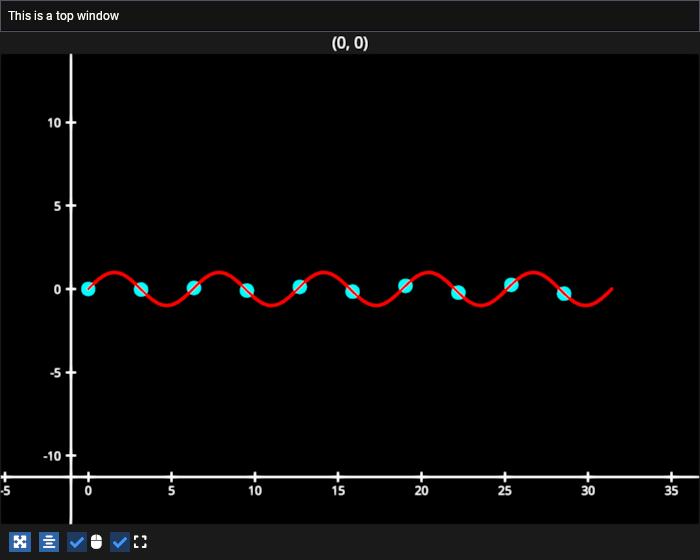
# test_example = true

import numpy as np
import fastplotlib as fpl

# subclass from ImguiWindow to make a custom ImGUI Window to place inside the figure!
from fastplotlib.ui import ImguiWindow
from imgui_bundle import imgui

# make some initial data
np.random.seed(0)

xs = np.linspace(0, np.pi * 10, 100)
ys = np.sin(xs) + np.random.normal(scale=0.0, size=100)
data = np.column_stack([xs, ys])


# make a figure
figure = fpl.Figure(size=(700, 560))

# make some scatter points at every 10th point
figure[0, 0].add_scatter(data[::10], colors="cyan", sizes=15, name="sine-scatter")

# place a line above the scatter
figure[0, 0].add_line(data, thickness=3, colors="r", name="sine-wave")


class ImguiExample(ImguiWindow):
    def update(self):
        imgui.text("This is a top window")


# make GUI instance
gui = ImguiExample()

# add it to the top edge of the figure
figure.add_imgui_window(
    gui,
    location="top",
    size=60,
    title="top window",
    window_flags=imgui.WindowFlags_.no_title_bar | imgui.WindowFlags_.no_resize,
)

figure.show()

# NOTE: fpl.loop.run() should not be used for interactive sessions
# See the "JupyterLab and IPython" section in the user guide
if __name__ == "__main__":
    print(__doc__)
    fpl.loop.run()
Total running time of the script: (0 minutes 0.094 seconds)