
Note
Go to the end to download the full example code.
YUV Image#
Example that shows how to use YUV images. Most videos are stored in this colorspace. Y stores luma at full resolution, UV stores chroma values. In yuv420p UV channels are stored at half the resolution of Y. In yuv444p, UV channels are stored at full resolution.
YUV is also called YCbCr for digital images.
For more info: https://en.wikipedia.org/wiki/Y%E2%80%B2UV
You can see the slight differences between yuv420 and yuv444 if you zoom into parts of the image where colors change rapidly over space, such as the astronaut’s patch.
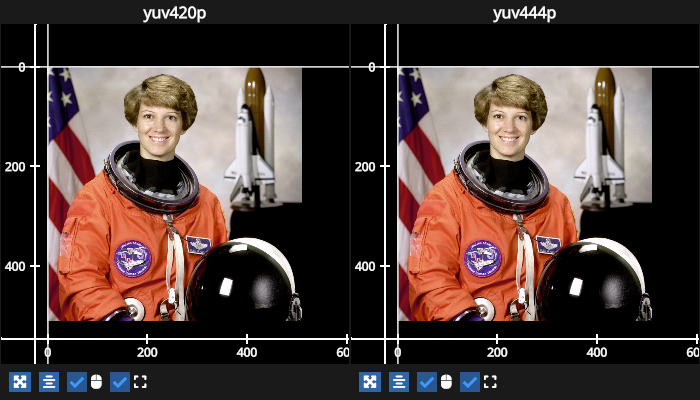
# test_example = true

import fastplotlib as fpl
import numpy as np
from skimage.color import rgb2ycbcr
import imageio.v3 as iio

# convert an rgb image to ycbcr for example purposes
img = iio.imread("imageio:astronaut.png")
img_yuv = rgb2ycbcr(img).astype(np.uint8)

y = img_yuv[..., 0]
u = img_yuv[..., 1]
v = img_yuv[..., 2]

figure = fpl.Figure(
    shape=(1, 2), names=["yuv420p", "yuv444p"], controller_ids="sync", size=(700, 400)
)

image1 = figure[0, 0].add_image_yuv(
    data=(y, u[::2, ::2], v[::2, ::2]), colorspace="yuv420p"
)

image2 = figure[0, 1].add_image_yuv(data=(y, u, v), colorspace="yuv444p")

cursor = fpl.Cursor()

for subplot in figure:
    cursor.add_subplot(subplot)

figure.show()


# NOTE: fpl.loop.run() should not be used for interactive sessions
# See the "JupyterLab and IPython" section in the user guide
if __name__ == "__main__":
    print(__doc__)
    fpl.loop.run()
Total running time of the script: (0 minutes 0.916 seconds)